Running Facebook and Instagram ads means constant checking. You watch numbers, test new creatives, argue over budgets, and then write it all up for the client. If you work at a digital marketing agency in Chennai and handle several client accounts at once, that routine eats up hours you would rather spend on strategy.
Claude AI can take a good chunk of that load. Connect it to your ad data and campaign tools, and it can dig through performance, spot what needs attention, draft fresh creative angles and help you make calls faster. With the right setup, some of this work can even shift from manual analysis to an automated workflow. So in this blog, we will take a closer look at how to automate Meta Ads with Claude AI, how to connect the tools it needs, how to build a simple monitoring routine and how to add automation without losing control of your accounts.
What Is Meta Ads Automation with Claude AI?
Put simply, it means using Anthropic’s AI assistant to read your advertising data, come up with recommendations and, where the connection allows it, carry out certain campaign tasks. Claude can look at how campaigns are performing, compare creative variations, point out where money is being wasted and prepare optimization suggestions. If it’s linked to an MCP server with the right permissions, it can also pull live ad data or run supported actions.
Here’s the distinction worth remembering. Claude supplies the thinking. The connected tools supply access to Meta Ads data and the ability to act on campaigns.
Without any integration, Claude can still analyze reports you upload. With a proper connection, it can work with the Meta Ads features that connection supports. Things like scheduled monitoring or automatic execution often need extra workflow infrastructure on top.
How Does Claude AI Connect with Meta Ads?
Three pieces usually make up the connection. Claude AI is the brain that reads your instructions, studies the data and produces insights. The Model Context Protocol (MCP) is an open protocol that lets AI applications talk to outside tools and data sources, and an MCP server lists the specific things Claude is allowed to do.
The Meta Marketing API is Meta’s own interface for pulling ad insights and managing campaigns, ad sets and ads.
In practice, it goes like this. You ask Claude to review your campaign performance. Claude finds the right tool exposed through the MCP connection, and that tool requests the authorized data from Meta. Claude then studies what comes back and shares its findings.
If the connection supports it, Claude can also prepare or carry out a campaign action once you’ve given approval.
One thing to keep in mind is that MCP doesn’t hand over unlimited access to your Meta Ads account. What Claude can actually do depends on the connector, the authentication, the permissions and the tools that connector offers.
What Can You Automate in Meta Ads with Claude AI?
Campaign performance analysis. Claude can summarize spend, impressions, clicks, CTR, conversions, CPA and ROAS. It can compare one reporting period with another, notice odd swings and flag campaigns that deserve a closer look.
Ad copy and creative testing. Ask Claude for alternative headlines, primary text, hooks and CTAs aimed at different audiences or objectives. It can also look at how your current creatives are doing and suggest new concepts to try. Publishing those variations, though, needs a supported connected tool or a separate workflow.
Budget optimization. Give Claude your CPA, ROAS or budget targets and it can check campaigns against them, then suggest where a budget change might be worth a look. If your integration supports budget edits, approved changes can be executed. If it doesn’t, you’ll apply the recommendations by hand.
Creative fatigue monitoring. By reviewing frequency, CTR, CPA and conversion trends, Claude can flag ads that seem to be losing steam. Treat those signals as a group, though, because falling performance can come from several different causes.
Automated reporting. Claude can turn raw ad data into a structured report that covers performance, notable changes and suggested next steps. If you want these reports to land in your inbox on a schedule, you’ll need a scheduler or automation tool, unless your connector already includes one.
How to Automate Meta Ads with Claude AI: Step-by-Step
Step 1: Prepare Your Meta Ads Account
First, make sure you have the right level of access to your Meta ad account through Meta Business Suite or Business Settings. If you manage accounts for clients, double-check that the correct business or partner permissions are in place.
Then decide which KPIs Claude should keep an eye on. Most people start with a target cost per acquisition, a minimum return on ad spend, daily or lifetime budget limits, a minimum conversion volume and a CTR or similar creative metric. These targets give Claude the context it needs to read your results properly. Without them, it’s just looking at numbers with nothing to measure them against.
Step 2: Choose Your Integration Method
The way you connect decides how much Claude can see and do.
| Method | Best suited for |
|---|---|
| Meta-supported MCP connector | Users with access to a supported official connection |
| Third-party MCP server | Marketers who need specific Meta Ads tools through an external integration |
| Custom Meta Marketing API integration | Developers building tailored advertising workflows |
| CSV report uploads | Marketers who want campaign analysis without a live connection |
Before you pick one, check what tools it offers, how authentication works, whether your account is eligible and whether it’s read-only, edit-capable or both.
CSV uploads are a sensible place to begin, since they let you test Claude’s analysis without connecting anything. Once you need live data or supported campaign actions, a trusted MCP connection makes more sense.
Step 3: Connect Claude to a Remote MCP Server
Exact steps vary with your Claude environment and the integration you’re using. Setting up a custom remote MCP connector generally follows the same few steps, so here’s the rough path. Open Claude and head to Customize, then Connectors. Choose the option to add a custom connector and enter the MCP server URL from your integration provider. Complete the authentication, review the permissions being requested and connect your account. Finally, enable the tools you actually need for your workflow.
On Team and Enterprise plans, an organization owner may have to set up the connector first.
A word of caution here. Connect only to MCP servers you’re confident about and don’t rush past the permission screen. If a server can make changes to your campaigns, budgets or ads, slow down and read exactly what you’re agreeing to.
Step 4: Verify the Connection and Available Tools
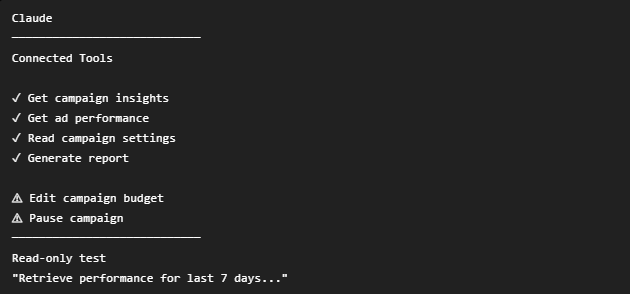
A working connection only tells you the link is live. Which advertising functions you can actually use is a separate question. Check which tools the integration really exposes. Can it fetch campaign insights? Can it reach ad-level performance? Does it support budget changes or pausing ads?
Start with a read only test prompt like this:
Retrieve the performance data for my selected Meta Ads account for the last 7 days. Show campaign names, spend, impressions, clicks, CTR, conversions, CPA and ROAS. Identify unavailable metrics and do not modify anything.
Then compare what Claude returns with Meta Ads Manager. Confirm the reporting period, the account currency, the attribution settings and how each metric is defined. If the data looks incomplete or doesn’t match, sort that out first. There’s no point trusting recommendations built on shaky numbers.
Step 5: Build a Campaign Monitoring Workflow
Pick one repeatable task to begin with, such as a weekly campaign audit. A practical workflow runs in this order: retrieve the data, compare it against your KPIs, flag exceptions, generate recommendations, ask for approval, apply the supported changes and verify the results.
You can also set simple review rules. If CPA stays above target for a set period, the campaign gets flagged for review. If conversion volume is too low to judge, Claude should call the data insufficient instead of jumping to a budget cut. And if a campaign is hitting its targets, Claude shouldn’t suggest changes just for the sake of it.
Your thresholds should reflect your own campaign goals and business situation. They aren’t universal benchmarks, so don’t copy someone else’s numbers blindly.
Step 6: Add Approval Rules and Monitoring
Once your read-only workflow gives you reliable results, you can think about switching on supported campaign actions. Set clear boundaries before you do. Ask for approval before pausing ads, changing budgets or touching targeting. Decide up front how big any single change is allowed to be, and jot down every change you approve. Once an action has gone live, open Meta Ads Manager and double-check that it did what you expected.
Want this to run every day or every week without you typing a prompt? Link it to a scheduler or an automation tool that can kick it off for you. A connector by itself doesn’t always come with scheduled execution.
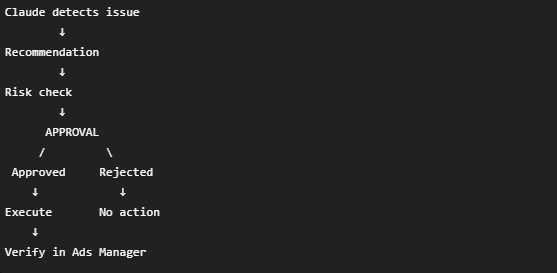
A Practical Example: Using Claude AI to Review Campaign Performance
Picture an e-commerce advertiser looking at two Meta Ads campaigns. The numbers below are hypothetical, just to show how Claude might read campaign data.
| Metric | Campaign A | Campaign B |
|---|---|---|
| Spend | ₹12,000 | ₹10,000 |
| Conversions | 60 | 25 |
| CPA | ₹200 | ₹400 |
| CTR | 2.4% | 1.5% |
| ROAS | 3.5 | 2.0 |
Say the advertiser’s target CPA is ₹250. Claude might tell you that Campaign A is comfortably ahead of the target and Campaign B is missing it. Then it would probably recommend digging into Campaign B’s creative, audience, landing page and conversion trends before a budget call is made.
After that, your best move is to request a change proposal. Giving Claude free rein to edit the campaign right away is the riskier way to go.
For example:
Based on this campaign data, prepare an optimization proposal. Include the campaign name, current CPA, target CPA, supporting metrics, recommended action, and potential risk. Flag insufficient data and do not execute changes without approval.
This gives you a decision process you can actually review. Campaign A doesn’t automatically get more budget, and Campaign B doesn’t automatically get paused. Conversion quality, attribution, campaign objectives and wider business factors all still matter.
Practical Claude AI Prompts for Meta Ads Automation
Well-structured prompts help Claude understand what to look at, which rules to follow and how to present its findings. Here are five you can adapt.
Campaign performance audit: Go through my Meta Ads campaigns for the past 14 days and compare them with the 14 days before that. Look at spend, CTR, conversions, CPA and ROAS. Point out any big changes, keep what the data shows separate from what might be causing it and tell me which campaigns deserve a closer look. Please don’t change anything.
Creative fatigue detection: Review my active Meta Ads creatives. Compare frequency, CTR, CPA and conversion trends over the last 14 days. Flag ads that may be experiencing creative fatigue, explain the evidence and suggest three new creative concepts. Do not pause or replace ads.
Budget adjustment recommendations: Check my active campaigns against their CPA and ROAS targets, then flag any that may need their budgets looked at. I’d like to see the current budget, your proposed budget, the metrics that back it up, your reason and the potential risk. Where the data isn’t sufficient, point that out. Nothing gets executed without my approval.
Weekly performance report: Put together a weekly Meta Ads report from the connected account data. Sum up spend, impressions, clicks, conversions, CPA and ROAS. Compare results with the previous week, flag missing data and provide three prioritized recommendations. Separate measured results from assumptions.
Structured campaign change proposal: Prepare a proposed change list based on the latest campaign data. For each recommendation, include the campaign name, current setting, proposed setting, supporting metrics, reason, and risk. Flag actions that exceed my predefined limits. Do not execute any changes until I approve the specific proposals.
If you plan to run these repeatedly, keep the prompts consistent and ask for structured outputs. That way it’s much easier to compare recommendations, review changes and catch mistakes over time.
Troubleshooting Common Claude AI and Meta Ads Automation Issues
Even with the right integration, connection, permission and data problems can crop up. Here’s what to check when something doesn’t behave.
| Issue | What to Check |
|---|---|
| Claude cannot connect to Meta Ads | Verify the MCP server URL, authentication status and connector availability. |
| Campaign data is missing | Look at your account access first, then the reporting filters, the date range and the tools the connector actually exposes. |
| Claude cannot modify a campaign | Find out whether the integration supports write actions at all, and whether it has been given the permissions it needs. |
| Metrics don’t match Ads Manager | Line up the attribution settings, reporting periods, currency and metric definitions on both sides. |
| Scheduled workflow doesn’t run | Make sure the scheduler is set up properly, the trigger is switched on and your authentication hasn’t expired. |
| Automation produces unexpected results | Review the prompt, source data, action permissions and execution logs. |
When something breaks, resist the urge to change five settings at once. Isolate the problem instead. Test data retrieval first, then check the analysis, and only after that try supported campaign actions.
Best Practices for Automating Meta Ads with Claude AI
Start with read-only access. Let the data retrieval and recommendations prove themselves before you enable any campaign changes.
Be specific about your KPIs. Claude works far better when it has campaign-level targets and business context than when you ask it to optimize everything at once.
Set limits on what it can do. Decide on maximum budget adjustments, which actions need approval and the conditions under which the workflow should stop.
Keep an audit trail. Note down the recommendations, approvals, actions taken and the performance that followed.
Protect your account access. Stick with integrations you trust, remove any permissions you don’t actually need and keep sensitive customer data out of the process.
Make a habit of reviewing the results. Ask yourself whether the setup is saving you time on repetitive tasks and giving you suggestions you can use. Just having automation in place doesn’t mean your ads will do better.
Limitations of Claude AI in Meta Ads Automation
Claude can take a lot of the effort out of managing campaigns, but it can’t stand in for a real advertising strategy or a person keeping an eye on things. What it can do depends on the connected tools, the data it can reach and the permissions it has been given.
It can’t perform actions the integration doesn’t support. Incomplete data, attribution differences, seasonal swings or missing business context can also push its recommendations in the wrong direction.
Scheduled monitoring and recurring actions need extra infrastructure when the connector doesn’t include them. So the safest way to think about Claude is as a decision-support tool. Double-check important recommendations, keep control of high-impact changes and expand automation only after the workflow has been properly tested.
Conclusion
Claude AI can make Meta Ads management a lot smoother by simplifying campaign analysis, creative testing, reporting and supported optimization tasks. With a suitable MCP integration, marketers can build repeatable workflows that cut manual effort while keeping the big decisions in human hands.
The key is to begin with reliable data, set clear KPIs and bring in campaign execution slowly. Automation only pays off when a good strategy sits behind it and someone is still watching the results. Get that balance right and it can settle into your advertising process as a tool you rely on.
We’re Infinix360, and for us digital marketing starts with data and keeps going with performance tracking. If you’d like to tidy up your advertising workflow or grow your presence online, browse our digital marketing expertise and our SEO services in Chennai. Together they show how one joined-up plan can move your business forward.